The photograph you choose is a crucial part of the input for your rating. A tilted head, strong shadow, extreme crop, or wide-angle selfie can drastically change the facial proportions that our browser-based model sees. Because the AI evaluates the geometry visible in the image, these guidelines will teach you how to take a photo for a PSL test that yields a more consistent result.
Photo Requirements
Before you upload an image, ensure it meets these basic photo requirements for the cleanest input:
- Subject: One person only in the frame.
- Angle: Face the camera directly to create a true front-facing PSL photo.
- Posture: Keep your head level.
- Environment: Use even, natural-looking lighting.
- Face: Keep a relaxed, neutral expression.
- Visibility: Make your face large enough to see clearly without any face-covering accessories.
- Authenticity: Avoid beauty filters and extreme close-ups that cause lens distortion.
- File Limits: Upload a JPEG, PNG, or WebP image smaller than 8 MB.
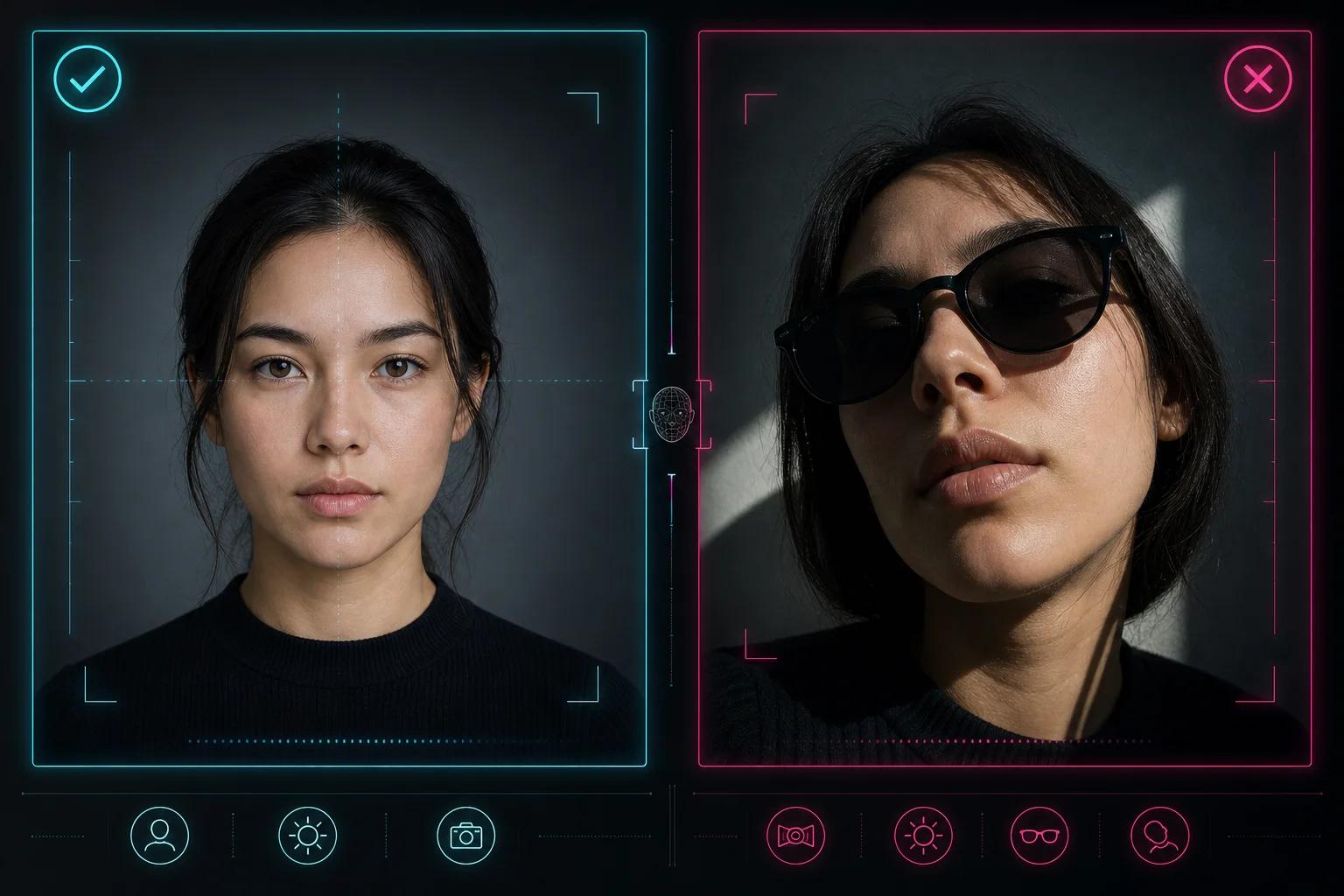
Illustrative checklist using one fictional adult: correct setup, incorrect angle, harsh side light, and facial obstruction.
Framing Your Photo
Submit a Front-Facing PSL Photo
Use a straight-on front-facing PSL photo rather than a side profile or a strong three-quarter angle. You must turn your shoulders and face directly toward the camera, keeping your nose near the center of the frame. A side angle changes the apparent jaw width, cheek projection, and facial symmetry visible to the model, which will result in an inconsistent score or cause the landmark scan to fail.
Keep Your Head Level and the Camera at Eye Level
Do not tilt your head up, down, or sideways. Keep the line between your eyes reasonably level and hold the camera near your eye height. This specific positioning gives the browser-based face landmark model a more stable, readable view of your same proportions, ensuring your test produces a reliable directional estimate.
Lighting and Expression
Use Neutral, Even Lighting
Good lighting is one of the most critical factors for a consistent score. You should use neutral, even lighting, such as soft daylight or evenly diffused indoor light. This setup is usually easier for the AI to read than a bright overhead bulb or a hard shadow cast across one side of your face. While the browser model may still work in imperfect lighting, strong shadows can obscure your jawline or artificially alter the symmetry measurements, making your photo less consistent.
Keep a Neutral Expression
Always keep a neutral expression. Relax your face entirely and avoid a large smile, an exaggerated expression, or a clenched jaw. Facial expressions physically move your mouth, cheeks, eyes, and jaw. Because the tool measures these exact geometric relationships, comparing a photo with a neutral expression to a smiling photo is not a like-for-like test.
Visibility and Avoiding Distortions
Make Sure Your Full Face Is Visible
Use a photo with one person in the image and keep the face large enough for the model to detect. You must remove sunglasses, masks, and anything that covers important facial landmarks. While your hair does not need to be completely pulled back, your eyes, nose, cheeks, mouth, and jaw should be clearly visible so the algorithm can map them accurately.
Avoid Filters and Lens Distortion
Do not use beauty filters, face-reshaping applications, heavy editing, or a very wide-angle close-up. A wide-angle selfie taken too close to the lens will cause severe lens distortion, making the center of your face look disproportionately large. This lens distortion changes the apparent shape of the face rather than simply showing the true geometry you want to compare.
Common Photos That May Fail
The browser-based model is designed to reject bad inputs rather than force an inaccurate score. FreePSLScore may be unable to produce a result when no clear face is found, more than one face is visible, the face is too small, or the head is turned too far from the camera. If that happens, do not assume it is a low score; simply try a brighter, closer, straight-on photo with one person only.
Why Two Photos Can Produce Different Scores
A common question is why two different pictures of the same person yield different results. A rating is based entirely on the selected image, not an unchanging identity label. The AI face rating model measures what it can see in that specific digital file.
Camera distance, lens distortion, lighting, crop, expression, head position, and analysis mode can all change the measured input. For example, if you take one photo with soft daylight and another under harsh overhead lighting, the geometry detected around your jaw and cheeks will change. For reliable progress comparisons, you must keep those physical and environmental conditions as similar as possible from one test to the next.
The PSL score method guide explains how those visible inputs become category signals and a final estimate.
When to Add More Photos
The Standard test gives you a baseline from one photo. A complete Deep report reuses that result. After payment, you can add one or two different front-facing selfies before confirming the report, or continue with the original photo alone.
For extra photos, keep the same camera position, light, distance and relaxed expression. Use separate captures, not copies of the same image. Multiple photos add a comparison of readings; agreement does not establish accuracy or guarantee a higher score. Once generated, the report is fixed.
Frequently Asked Questions
Can I use a side-profile photo?
No. The basic FreePSLScore estimate is designed for a mostly front-facing PSL photo. A pure side profile can change the measurements dramatically and may be rejected by the face-quality checks because the model cannot read your facial symmetry.
Should I smile in my photo?
A neutral expression is recommended for a more consistent comparison. A smile actively changes your eyes, cheeks, mouth, and jaw position, which will alter the geometric relationships the tool measures.
Can I wear glasses or makeup?
You should keep important facial landmarks visible and avoid anything that strongly changes or obscures your face. The clearer and more natural the input, the easier it is to compare results.
What image formats are supported?
The tool supports JPEG, PNG, and WebP images smaller than 8 MB. Ensure you meet the photo requirements with one clear face per image.
Does FreePSLScore upload my photo for the test?
No. The basic estimate runs locally in your browser. The selected image is not uploaded to our server in this version, keeping your test completely private.
Get Your Score
Once you have a consistent photo, read the scale guide to understand score ranges and community tier names.